Aligning marketing campaigns with measurable pipeline requires integrated systems. HubSpot provides a unified marketing and CRM ecosystem that connects every visitor interaction directly to revenue.
Top Reasons to Consider HubSpot
All-in-One Growth Platform: Consolidate landing pages, email marketing, social management, ad attribution, and contact records in one place.
Native CRM Data Binding: Every form fill, page view, and email interaction updates contact timelines automatically without third-party webhooks.
Lifecycle Lead Nurturing: Automate personalized drip campaigns and trigger internal notifications when prospects reach buying thresholds.
Smart Content Personalization: Deliver tailored messaging, testimonials, and CTAs based on a visitor's lifecycle stage or industry.
Closed-Loop Reporting: Track multi-touch attribution to see exactly which blog posts, ad campaigns, and assets generated closed-won revenue.
Extensive App Marketplace: Integrate seamlessly with Salesforce, Shopify, Google Ads, Slack, and Zoom.
HubSpot Custom Modules and Themes: A Developer Deep Dive
A HubSpot site is only as flexible as its modules. Build them well and marketers can launch new pages in an afternoon without a developer. Build them badly and every new page becomes a ticket, every brand update becomes a rebuild, and the theme slowly fills with near-identical copies of the same component.
This guide walks through how HubSpot custom modules and themes are structured, how to design fields that marketers can use safely, and the patterns that keep a theme maintainable as it grows. It assumes you know HTML and CSS; the HubSpot-specific parts are explained as we go.
How HubSpot themes and modules fit together
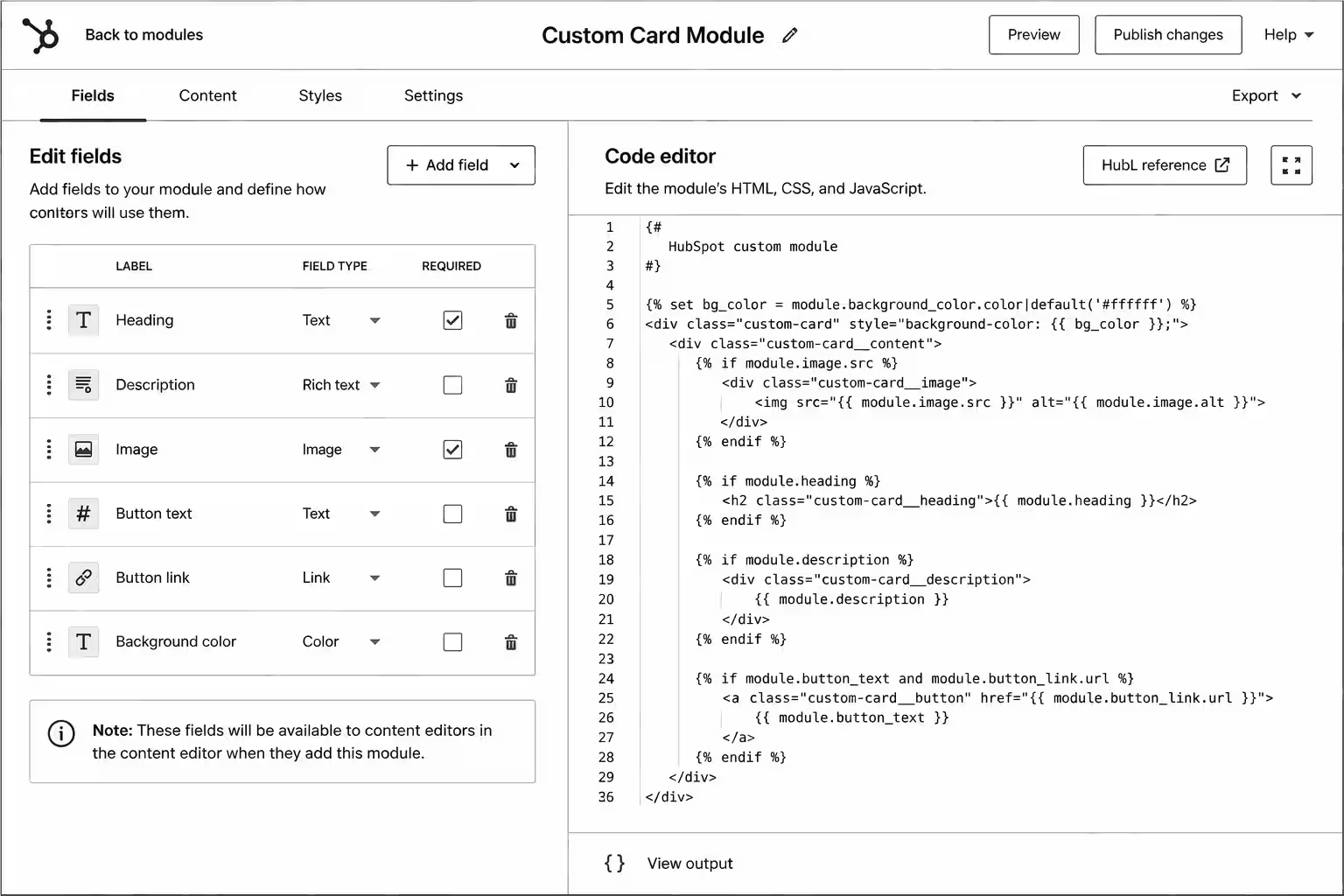
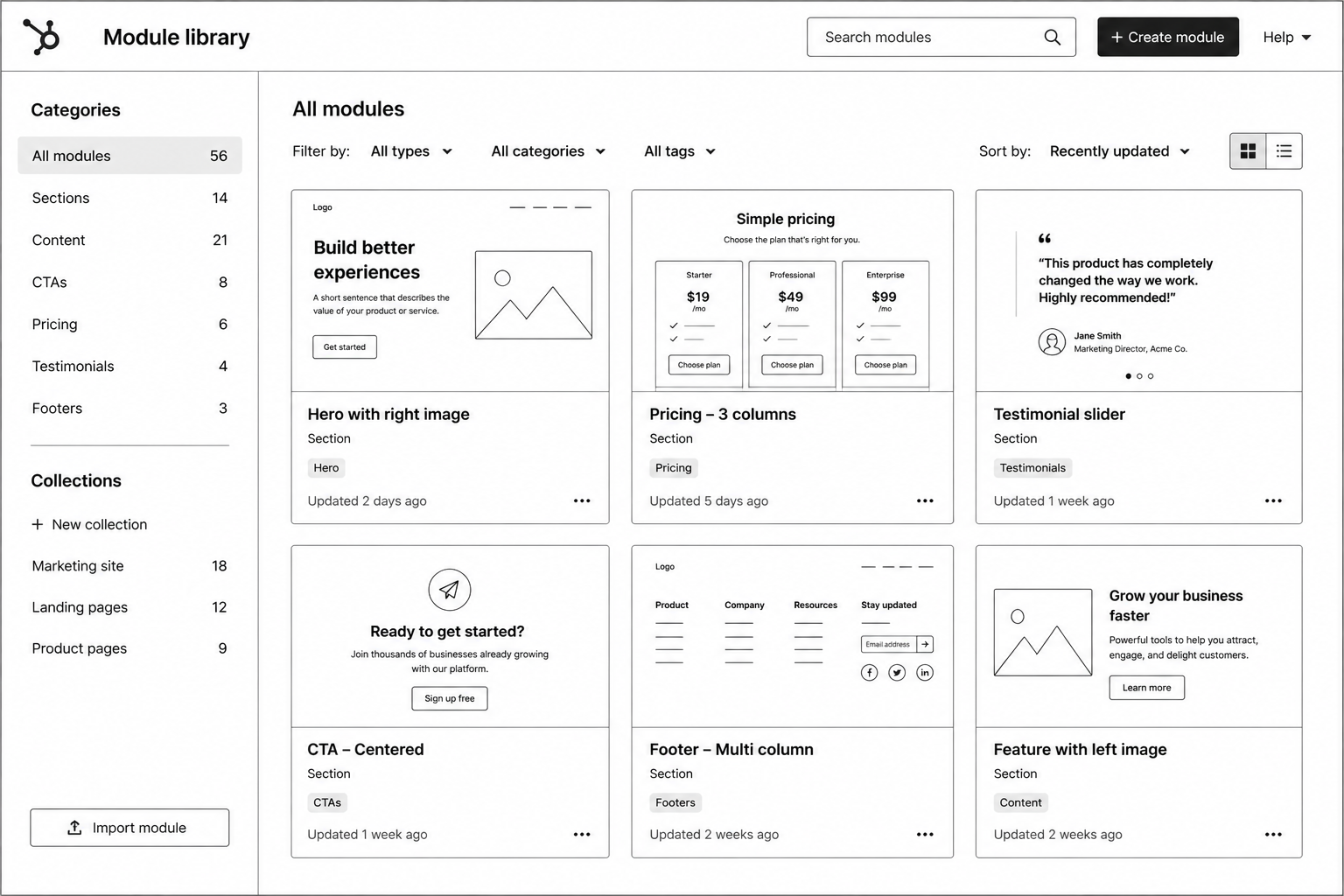
A theme is a package of templates, modules, stylesheets, scripts and global settings that together define a site's look and building blocks. A template defines the layout of a page type, often with drag-and-drop areas where editors place modules. A module is a reusable component, such as a hero, a pricing table or a testimonial slider, with fields the editor fills in.
Themes and modules are built locally and uploaded with the HubSpot CLI. Templates and modules use HubL, HubSpot's templating language, to output field values, loop through repeaters and apply logic.
Anatomy of a custom module
Each module lives in its own .module folder with a small set of files:
module.html – the markup, with HubL that reads field values.
module.css – styles that load only when the module is on the page.
module.js – any script the module needs.
fields.json – the fields editors see in the page editor.
meta.json – settings such as the label, icon, whether the module is global and which content types can use it.
Keeping CSS and JavaScript inside the module means pages only load what they use, which helps page speed as the module library grows.
Designing fields marketers can actually use
Fields are the interface between your code and the marketing team. Good field design is the difference between a module that gets used and one that gets avoided.
Use the right field type
HubSpot offers text, rich text, image, link, URL, choice, boolean, number, colour, font, CTA, form, video and other field types. Use a choice field for layout variants instead of asking editors to type class names, a boolean for optional elements, and an image field with alt text rather than a rich text field with an embedded image.
Group and repeat
Group related fields (all the settings for a button, all the content for a card) so the editor panel stays readable. Make a group repeatable with occurrence settings for lists such as features, logos or FAQs, and set sensible minimum and maximum counts.
Separate content from style
Put content fields on the Content tab and visual options on the Styles tab. Editors working on copy then never see spacing or colour controls by accident.
Set defaults and help text
Every field should have a realistic default so the module looks finished when it's first dropped onto a page. Short inline help text (for example, "Recommended: 1600 × 900, under 200 KB") prevents most support questions.
Limit choices on purpose
Offer brand colours and approved spacing values, not a free colour picker and a pixel input. Constraints keep pages on brand without a developer reviewing every page.
Theme settings: one place for brand decisions
A theme has its own fields.json for global settings such as brand colours, fonts, button styles and spacing. Templates and stylesheets read these values with HubL, so a brand colour changed once in theme settings updates every page. Put anything that should be consistent site-wide in theme settings, and keep module-level style fields for genuine per-instance choices.
Drag-and-drop areas and templates
Drag-and-drop areas let editors add, remove and reorder modules on a page. Give each template a sensible default layout of sections so new pages start structured, and create a small number of templates (home, landing page, standard page, blog post, blog listing) rather than one per page. Fewer templates means fewer places for layouts to drift apart.
Patterns that keep a theme maintainable
Build a section library, not page-specific modules. "Feature grid" with layout options beats "Homepage features" and "Pricing page features".
Use global modules for shared content. Headers, footers and site-wide CTAs should be edited once.
Write semantic, accessible markup. Let editors choose heading levels where a module can appear in different positions, and require alt text on images.
Keep JavaScript optional. Content should be readable if a script fails; sliders and tabs should work with a keyboard.
Version control everything. Keep the theme in Git, deploy with the CLI and use a test portal or sandbox before pushing to production.
Document each module. A short internal page with a screenshot, field descriptions and do's and don'ts saves hours of training.
Performance and SEO
Modules affect page speed more than most teams realise. Serve images through HubSpot's image resizing with width and height attributes, lazy-load images below the fold, avoid loading a slider library on pages that don't use a slider, and keep each module's CSS small. For SEO, make sure modules output real headings and text (not text inside images), and that blog and landing page templates expose meta title, description and social image settings.
Common mistakes
Duplicating modules for small variations. Add a choice field instead.
Hard-coding content. Anything a marketer might change should be a field.
Too many style controls. Free-form options break brand consistency.
Editing in the design manager without source control. Changes get lost or overwritten between developers.
Skipping editor testing. Watch a marketer build a page with your modules before launch.
FAQ
Do I need a custom theme, or can I use a marketplace theme?
A marketplace theme is fine for a quick launch. A custom theme pays off when you need a specific design, tighter performance or modules that match your real content.
Can I use React in HubSpot modules?
Yes. HubSpot supports JavaScript-rendered modules through its CMS React tooling, alongside classic HubL modules. Most marketing sites still work well with HubL modules.
How many modules does a typical theme need?
Usually fewer than teams expect. A well-designed set of 20 to 30 flexible modules covers most B2B marketing sites.
Can existing pages switch to a new theme?
Pages are tied to their templates, so switching themes usually means rebuilding pages on the new templates. Plan the migration as a project.
Conclusion
Good HubSpot modules give marketers freedom inside clear guardrails. Design fields around how editors work, keep brand decisions in theme settings and treat the theme as code under version control. If you need a theme built or an existing one cleaned up, see our HubSpot custom modules and theme development services, or read how agencies outsource HubSpot builds white-label.
HubSpot Custom Development Toolkit — module requirements document, HubSpot theme architecture guide, reusable component planner, developer handoff template, QA framework, and optimization checklist to build scalable HubSpot websites faster.
HubSpot vs Salesforce: Honest 2026 Comparison for Growing Teams
HubSpot and Salesforce are both excellent CRMs. The question is never which one is better in general; it's which one fits your team's size, processes and in-house skills right now, and which one will still fit in three years. Choosing wrong is expensive either way: an over-built Salesforce org that nobody can maintain, or a HubSpot portal stretched past the point where it fits your sales process.
This comparison looks at the decision the way growing B2B teams actually face it: setup effort, day-to-day use, customisation, reporting, marketing, AI and total cost of ownership.
The short answer
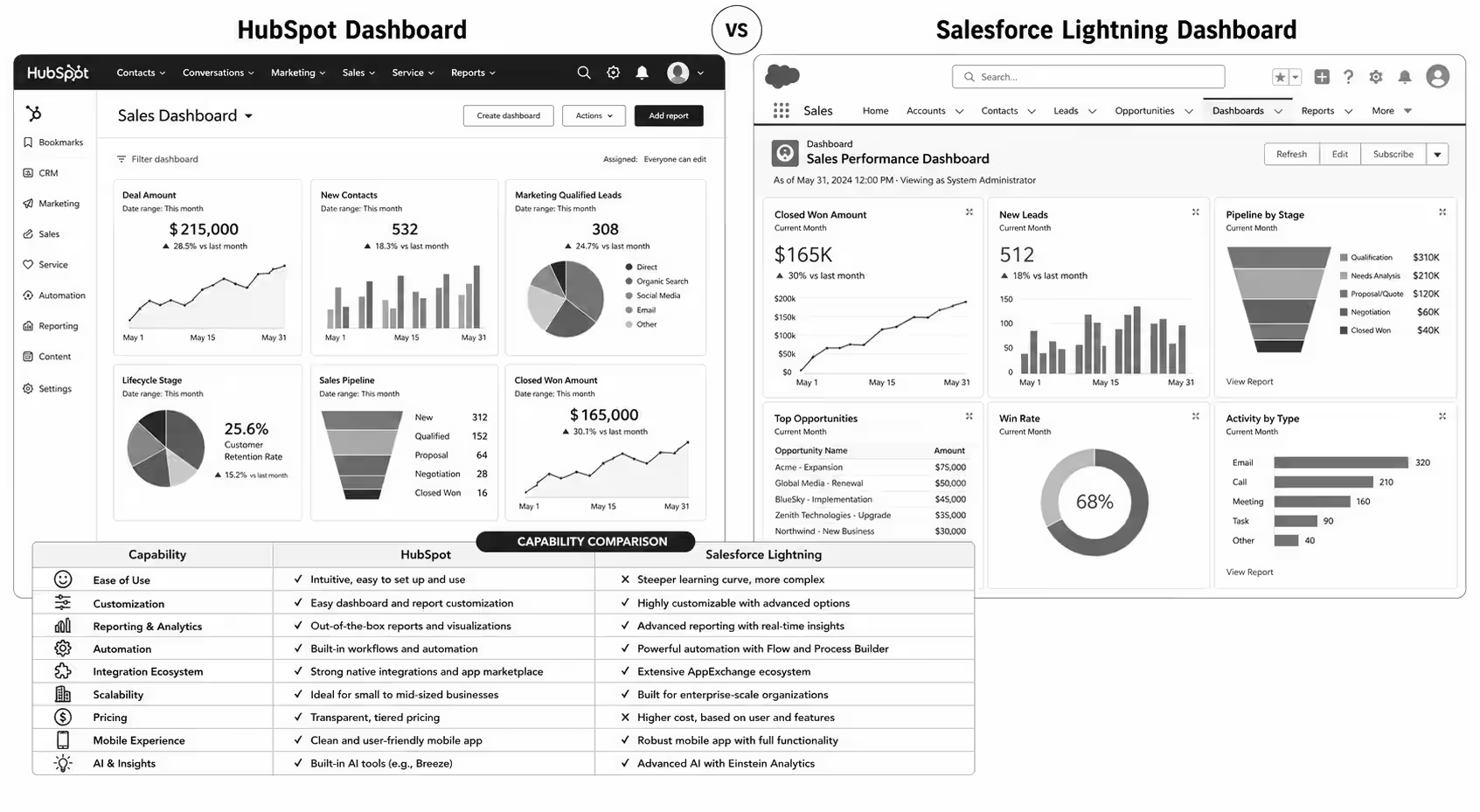
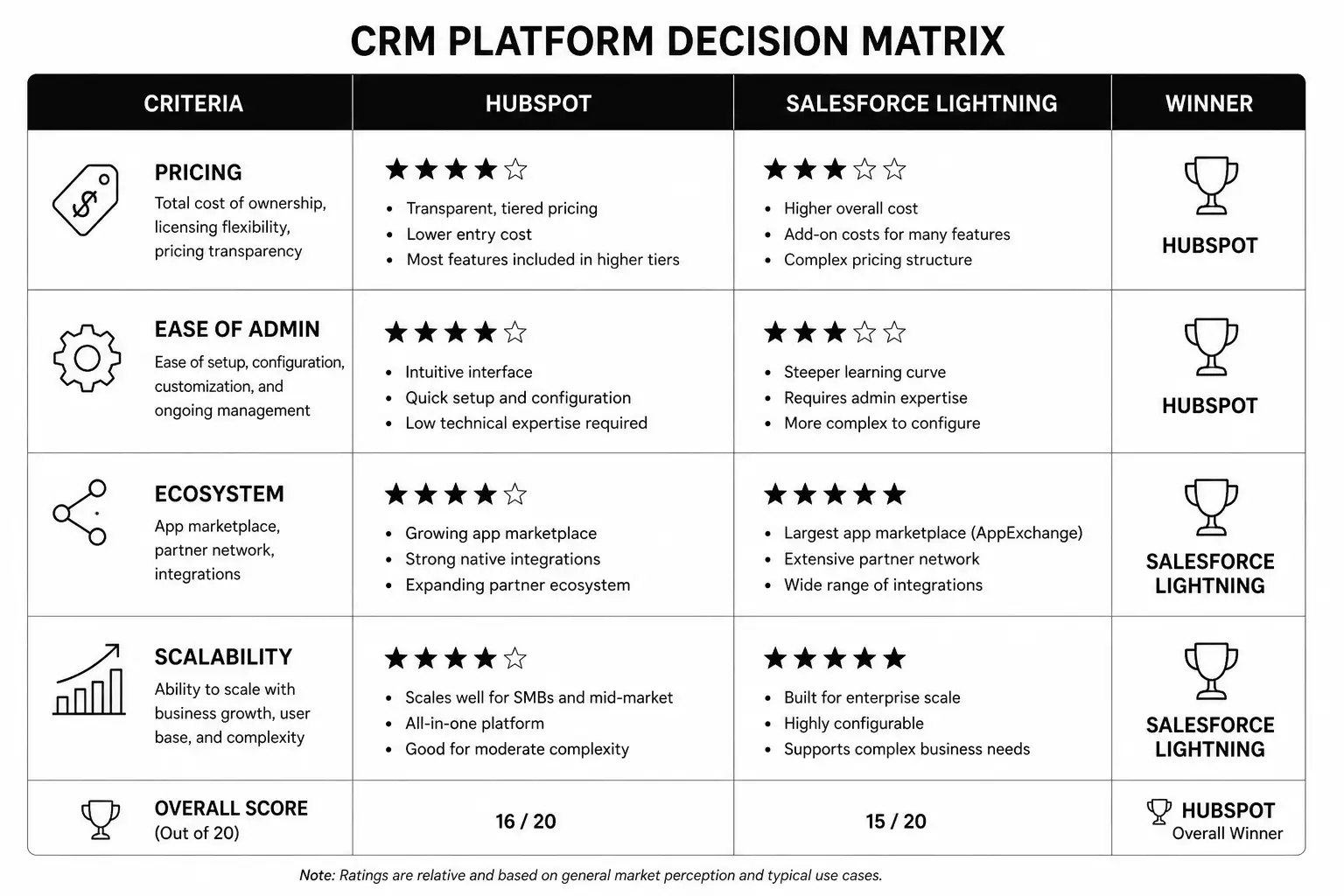
Choose HubSpot if you want marketing, sales and service on one platform that your team can run without a dedicated admin, and your sales process fits standard pipelines with some customisation. Choose Salesforce if you have complex, highly specific processes, large sales teams with territory and approval rules, heavy integration needs and the budget for an admin or partner to maintain it.
Side-by-side comparison
Area
HubSpot
Salesforce
Platform model
One platform: Smart CRM plus Marketing, Sales, Service, Content, Data and Commerce hubs
Separate clouds and products (Sales Cloud, Service Cloud, Marketing Cloud and others) on a shared platform
Setup effort
Weeks for most growing teams
Often months, usually with a partner
Ease of use
Designed for non-technical users
Powerful but needs more training
Customisation
Custom objects, properties, pipelines and workflows; code via custom actions and UI extensions
Deep customisation with Flow, Apex, custom objects and a large app ecosystem
Admin needs
Can be run by a marketing or RevOps generalist
Usually needs a certified admin as the org grows
Marketing tools
Built into the same platform
Separate products, such as Marketing Cloud Account Engagement
AI
Breeze assistants and agents across hubs
Einstein and Agentforce across clouds
Pricing model
Per hub and edition, seats, plus marketing contact tiers
Per user per edition, plus add-ons and products
Both vendors change plans and prices often, so check their current pricing pages before you build a budget.
Setup and time to value
HubSpot's main advantage for growing teams is speed. A typical B2B setup covers properties, pipelines, lifecycle stages, email and forms, integrations and the first workflows, and teams are usually using it daily within weeks. Our HubSpot CRM implementation guide walks through the steps.
Salesforce can be configured to match almost any process, but that flexibility means more decisions, more configuration and usually a partner-led implementation. For large or unusual sales processes, that investment pays off. For a 15-person sales team with a standard pipeline, it can be months of work for features nobody uses.
Day-to-day use and adoption
A CRM only works if salespeople log activity in it. HubSpot's interface, inbox integration and built-in calling and meeting tools tend to get faster adoption from reps. Salesforce is powerful in the hands of trained users and admins, and its Lightning interface can be tailored to each role, but that tailoring is work someone has to do.
Customisation and complexity
This is where Salesforce leads. Complex approval chains, territory management, CPQ, multi-currency enterprise deals, partner portals and deep custom logic are all well supported, and AppExchange offers apps for almost any need. HubSpot has closed much of the gap with custom objects, advanced pipelines, custom code workflow actions and app development tools, but very complex orgs still tend to fit Salesforce better.
Reporting
HubSpot's reports and dashboards are easy to build and cover most marketing and sales questions, with custom report builders and attribution on higher tiers. Salesforce reporting is extremely flexible, and teams with heavy analytics needs often add Tableau or a data warehouse. In both, report quality depends on data quality, so define properties and stages carefully.
Marketing alignment
If marketing and sales share the same data and the same funnel, HubSpot's single platform is a real advantage: email, forms, landing pages, ads, scoring and CRM records all live together. With Salesforce, marketing usually runs on a separate product connected to the CRM, which works well but adds a sync to manage.
Total cost of ownership
Licence price is only part of the cost. Add implementation, integrations, training, an admin's time and the cost of changes over three years. HubSpot often wins on total cost for small and mid-size teams because it needs less specialist admin time. Salesforce can be more cost-effective at large scale, where its flexibility replaces several other tools.
Questions to ask before you decide
How many sales users will you have in two to three years?
Does your sales process fit standard pipelines, or does it need complex approvals and territories?
Who will administer the CRM day to day?
Do marketing and sales need to work from the same platform?
Which systems must the CRM integrate with, and how?
What budget is realistic for implementation and ongoing admin, not just licences?
Switching between them
Teams do move in both directions. Moving from Salesforce to HubSpot usually happens when the org has become too complex and costly for its size. Moving to Salesforce happens when a company's sales process outgrows HubSpot. Either migration needs a data map, a clean-up of old records and fields, rebuilt automation and a cutover plan.
FAQ
Is HubSpot only for small businesses?
No. HubSpot's Enterprise tiers are used by large companies, though very complex enterprise sales processes often still suit Salesforce better.
Can HubSpot and Salesforce work together?
Yes. HubSpot has a native Salesforce integration, and many companies run HubSpot for marketing with Salesforce as the sales CRM.
Which is better for AI features?
Both are investing heavily: HubSpot in Breeze, Salesforce in Einstein and Agentforce. Choose on platform fit first; the AI features will keep changing.
How long does a HubSpot implementation take?
For most growing B2B teams, a core setup takes a few weeks, with further hubs and automation added in phases.
Conclusion
Pick the CRM your team can run well, not the one with the longest feature list. For most growing B2B teams, that's HubSpot; for complex, large-scale sales operations, Salesforce is often worth its extra overhead. If you're leaning towards HubSpot, our HubSpot CRM setup and onboarding services can get you live quickly, or book a call to talk through your requirements.
HubSpot vs Salesforce Comparison Toolkit — CRM feature scorecard, business requirements worksheet, cost calculator, automation comparison guide, reporting checklist, and implementation roadmap to confidently choose the right CRM for your business.
HubSpot CRM Implementation Guide: 90-Day Rollout for B2B Companies
HubSpot CRM Implementation Guide: 90-Day Rollout for B2B Companies
HubSpot is the easy CRM to start using and one of the harder CRMs to implement well. The product is designed to be turn-key — and that's precisely why most rollouts stall. Teams import a contact list, configure a couple of pipelines, and call it live. Six months later, sales is back in spreadsheets and marketing has lost track of which leads are real.This HubSpot CRM implementation guide is the 90-day rollout plan our HubSpot development team runs for B2B companies between 10 and 250 employees. It covers data model, migration, automation, reporting, and the adoption playbook that decides whether the CRM lasts past month four.If you're still deciding between HubSpot and Salesforce, read the HubSpot vs Salesforce comparison first.
What HubSpot CRM Implementation Actually Means
Implementation is more than a setup checklist. A real HubSpot CRM implementation is a structured project that aligns four things: your data model, your sales process, your marketing automation, and your team's daily behaviour. Each one is solvable; the integration of all four is where most projects fail.A successful rollout produces:
A clean, deduplicated database with consistent property naming
Pipelines that match how your team actually sells
Automation that does the busywork without breaking edge cases
Reports that surface the metrics leadership actually checks
Adoption from sales, marketing, and CS without daily friction
Why HubSpot CRM Implementation Matters in 2026
Three forces make 2026 the year to do this properly.1. HubSpot's AI features only work on clean data. Breeze (HubSpot's AI suite) summarises deals, scores leads, and drafts outreach. Garbage data in, garbage AI out. The teams getting real value from Breeze in 2026 are the ones who fixed their data model first.2. RevOps is now a board-level conversation. Pipeline visibility, attribution, and forecast accuracy are CFO concerns. A messy CRM costs you in meetings, not just operations.3. Sales-led + product-led hybrids need real CRM rigor. If your B2B motion blends inbound, outbound, and product-qualified leads, your CRM needs to track all three cleanly — and most don't.
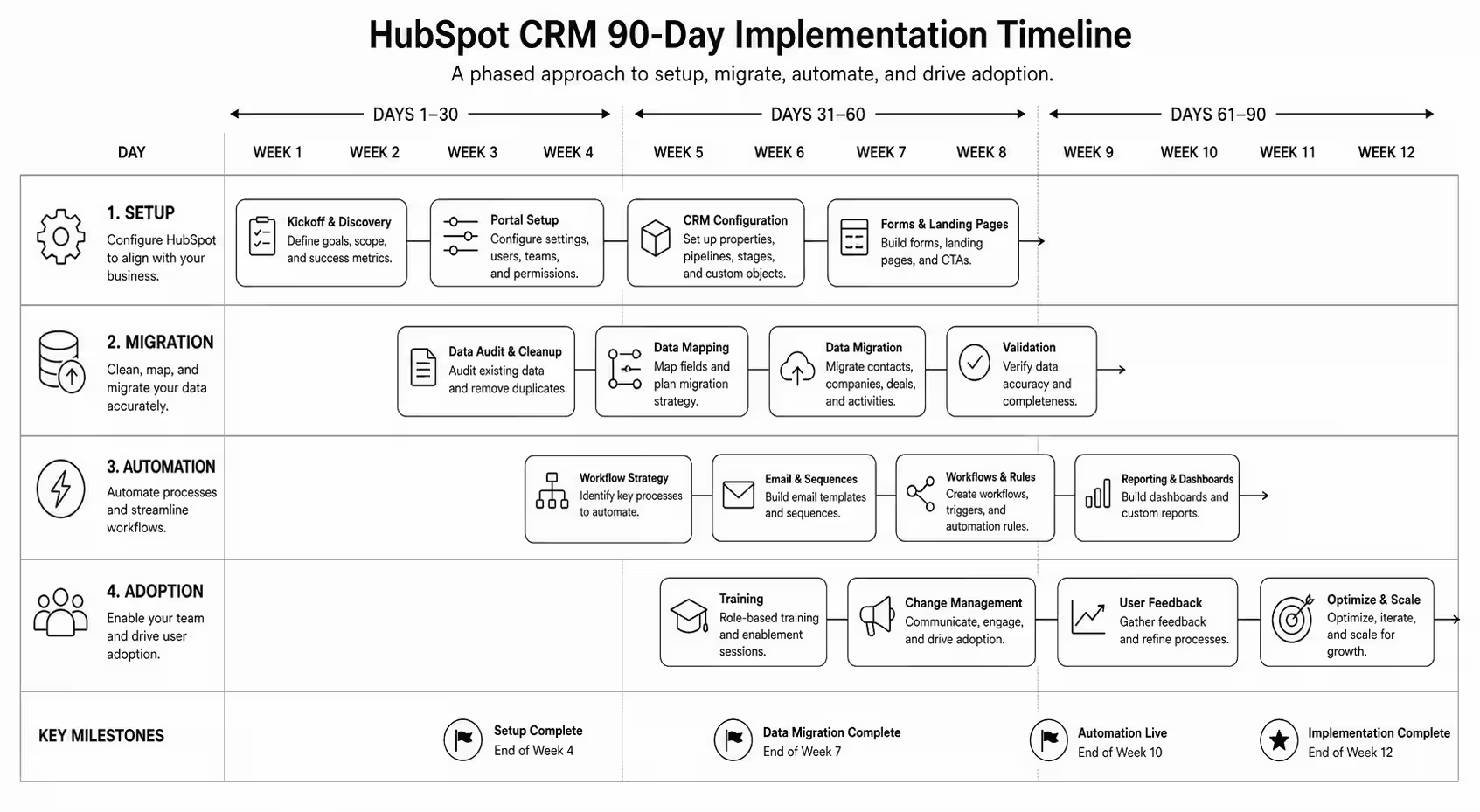
How a 90-Day HubSpot CRM Rollout Works
The rollout splits into three 30-day phases: foundation, automation, and adoption. Most failed rollouts skip phase one and rush to phase two — automating broken processes makes them worse, not better.
Days 1–30: Foundation
Stakeholder mapping. Identify the daily users (SDRs, AEs, marketing, CS) and the data consumers (leadership, finance).
Data model design. Define properties on Companies, Contacts, Deals, Tickets. Document property purpose, type, and ownership.
Pipeline architecture. Design pipelines and stages around your actual sales process — not HubSpot's defaults.
Lifecycle stages. Define what each stage means (Lead → MQL → SQL → Opportunity → Customer) and the criteria for transitions.
Migration plan. If migrating from another CRM, map fields, owners, and history. Plan deduplication.
User permissions. Set up teams, roles, and access. Default settings expose too much.
Days 31–60: Automation
Workflows for lifecycle transitions. Automatic stage updates based on behaviour, not just manual changes.
Lead routing. Round-robin, territory-based, or AE-of-the-month — whatever matches your model.
Lead scoring. Start simple (rules-based), graduate to predictive once you have data. See AI lead scoring guide.
Email sequences and templates. Library of approved outbound and follow-up templates per persona.
Task automation. Auto-create follow-up tasks at stage transitions; auto-create check-ins for stalled deals.
Integration setup. Connect tools that feed CRM data — calendar, email, calling, Slack, your CMS, your product analytics.
Days 61–90: Adoption
Training by role. SDRs, AEs, marketing, and CS each need different training. Generic onboarding fails.
Reporting and dashboards. Build the 5–8 dashboards leadership will actually check weekly. Cull the rest.
Daily standup integration. Make CRM the source of truth for the metrics discussed in standup.
Hygiene rituals. Weekly deal review, monthly data audit. Without these, the CRM degrades within 90 days.
Manager enablement. Sales managers must run reviews from HubSpot, not from spreadsheets. Otherwise reps never trust the system.
Iteration cadence. Quarterly review of properties, workflows, and reports. Prune, don't accumulate.
Mid-article CTA → Need a HubSpot specialist to run the 90 days for you? Book a HubSpot CRM rollout call and we'll scope the project in 30 minutes.
Step-by-Step: The Foundation Phase in Detail
1. Audit your current state
Before you touch HubSpot: document the existing process. What CRM (or spreadsheet) is being used? What pipelines exist? What reports run? Where does data leak?
2. Design the data model on paper
List every property your team needs on each object. Group them: identification (name, email), firmographic (company size, industry), behavioural (last visit, last email open), commercial (deal value, close date), operational (owner, source, status).
3. Set up the HubSpot account properly
Configure currency (multi-currency if you sell across UK/USA)
Set timezone, fiscal year
Create teams matching your org structure
Set up users with appropriate permissions
Configure the master Brand Kit (logo, colors) for templates
4. Create custom properties before importing data
If you import first and add properties later, you'll have inconsistent data. Property-first, then import.
5. Build pipelines and stages
For sales: typical 5–7 stages from Connected to Closed Won/Lost. For CS: separate pipeline for renewals and expansions. For support: ticket pipeline with priority and SLA.
6. Configure lifecycle stages and lead status
Define the criteria. Document them. Make them automatic where possible (workflows that move contacts from Lead to MQL based on score thresholds).
7. Migrate data with a clean import file
Dedupe, standardise (capitalisation, country codes, phone formats), map owners, validate emails. Import companies first, then contacts, then deals.
8. Validate
Spot-check 50 records across all object types. Confirm associations, property values, and ownership. Fix the data model before automating on top of it.
Best Tools for HubSpot CRM Implementation
HubSpot Operations Hub — for data quality, sync, and custom-coded actions. Worth the upgrade for >100-employee implementations.
Insycle — bulk data cleansing and dedup. Saves weeks on migration projects.
HubSpot's Migration IQ — for Salesforce-to-HubSpot migrations specifically.
Reveal or Crossbeam — partner-data overlay. Rich for B2B account expansion.
Default Tasks app — for automated task creation at stage transitions.
Looker Studio + HubSpot connector — for cross-tool reporting (HubSpot + product + ad spend).
Common HubSpot Implementation Mistakes
Importing data before designing properties. The single most common failure mode. Inconsistent data is hard to clean later.
Copying competitor pipelines. Your sales process isn't theirs. Design for how your team actually sells.
Over-automating early. Rules nobody understands break in production. Start with manual processes, automate once you've seen the edge cases.
Skipping training. A perfect CRM with no adoption is worse than a clunky one used daily.
No data hygiene rituals. Without weekly hygiene, the CRM degrades quickly.
Treating Marketing Hub and Sales Hub as separate projects. They share data — implement them together.
Ignoring HubSpot AI from day one. Breeze is genuinely useful when configured early. See marketing AI guide.
FAQ — HubSpot CRM Implementation
How long does HubSpot CRM implementation take?
For B2B companies under 250 employees, 90 days is a realistic full rollout including foundation, automation, and adoption. Larger orgs or complex Salesforce migrations can take 6 months.
How much does HubSpot CRM implementation cost?
Platform costs vary by hub and seat count (typically $2k–$15k/mo for mid-market). Implementation services from a HubSpot partner agency typically run $15k–$80k depending on complexity. Worth pricing properly — bad implementations are expensive to redo.
Should I hire a HubSpot partner agency or do it in-house?
If RevOps is a permanent function in your org, hire in-house long-term but use a partner for the rollout. If RevOps is a one-time project, partner-led is cleaner. See the HubSpot agency selection guide.
Can I use HubSpot CRM for free?
Yes — HubSpot's free CRM is genuinely capable. The free tier holds for <50-person teams with simple pipelines. Past that, paid hubs unlock the automation and reporting needed for serious RevOps.
Does HubSpot replace Salesforce?
For most B2B companies under 500 employees, yes. Above that, the answer depends on data complexity, ecosystem dependencies, and admin overhead tolerance. See the HubSpot vs Salesforce comparison.
How do I get my sales team to actually use HubSpot?
Three levers: make it easier than the alternative (mobile + Gmail/Outlook integration), make manager reviews run from it, and tie compensation visibility to it. The first 60 days of behavioural reinforcement decide adoption.
Conclusion: Implementation Is Where HubSpot ROI Is Won or Lost
HubSpot is one of the best CRMs for B2B companies — but only if implementation is done with the same rigor you'd apply to any other system that runs your revenue operations. The 90-day plan above isn't aggressive; it's the realistic baseline for a rollout that sticks.Our HubSpot development team has run CRM implementations for B2B SaaS, professional services, and ecommerce brands across the UK and USA. Book a HubSpot rollout call and we'll scope your 90-day plan in 30 minutes.Download the HubSpot 90-Day Implementation Plan — the exact roadmap and checklist we run for clients.
HubSpot CRM 90-Day Implementation Blueprint — CRM audit checklist, implementation roadmap, pipeline configuration guide, workflow automation planner, team training checklist, and KPI dashboard to build a scalable HubSpot CRM system.

.svg)






.svg)
.svg)
.png)

.svg)


.svg)
.svg)
.svg)
.svg)
.svg)
.svg)



.svg)