How Shopify Development Can Transform Your Business
12 MIN
May 14, 2026
In this article
Share
Introduction
In modern ecommerce, your storefront is your primary conversion engine. Professional Shopify development allows brands to scale operations, deliver seamless shopping experiences, and lift lifetime customer value.
The Core Advantages of Shopify Development
Custom Theme Architecture: Tailor your storefront to match your unique brand identity with modular sections that marketing teams can update safely.
Mobile-First Performance: With over 70% of shoppers browsing on mobile, custom responsive design ensures fast page loads and thumb-friendly checkout paths.
Enterprise Reliability & Security: Built-in PCI compliance, global CDN hosting, and automatic platform updates protect transactions and uptime during peak sales.
App Stack Optimization: Streamline third-party apps to prevent script bloat and maintain green Core Web Vitals.
SEO-Friendly Structure: Clean URL structures, automated XML sitemaps, and structured metadata maximize organic search visibility.
Impact on Revenue and Operational Scale
Higher Checkout Completion: Accelerated payment methods (Shop Pay, Apple Pay) and low-friction checkout flows reduce cart abandonment.
Automated Inventory & Order Flows: Synchronize stock levels across multi-location warehouses and 3PL partners automatically.
Actionable Analytics: Leverage cohort reporting and conversion funnels to refine marketing spend and merchandising.
Shopify Plus Migration: Moving From Standard Without Breaking Revenue
Moving from Shopify to Shopify Plus is less of a migration than most merchants expect, and more of one than most agencies admit. The store itself doesn't move: your products, customers, orders and theme stay where they are when you upgrade the plan. What changes is what you can do with checkout, B2B, automation, expansion stores and APIs, and that is where projects either add revenue or quietly break it.
This guide explains when Plus is worth it, what actually changes, and a step-by-step plan for upgrading without disrupting checkout, apps or SEO.
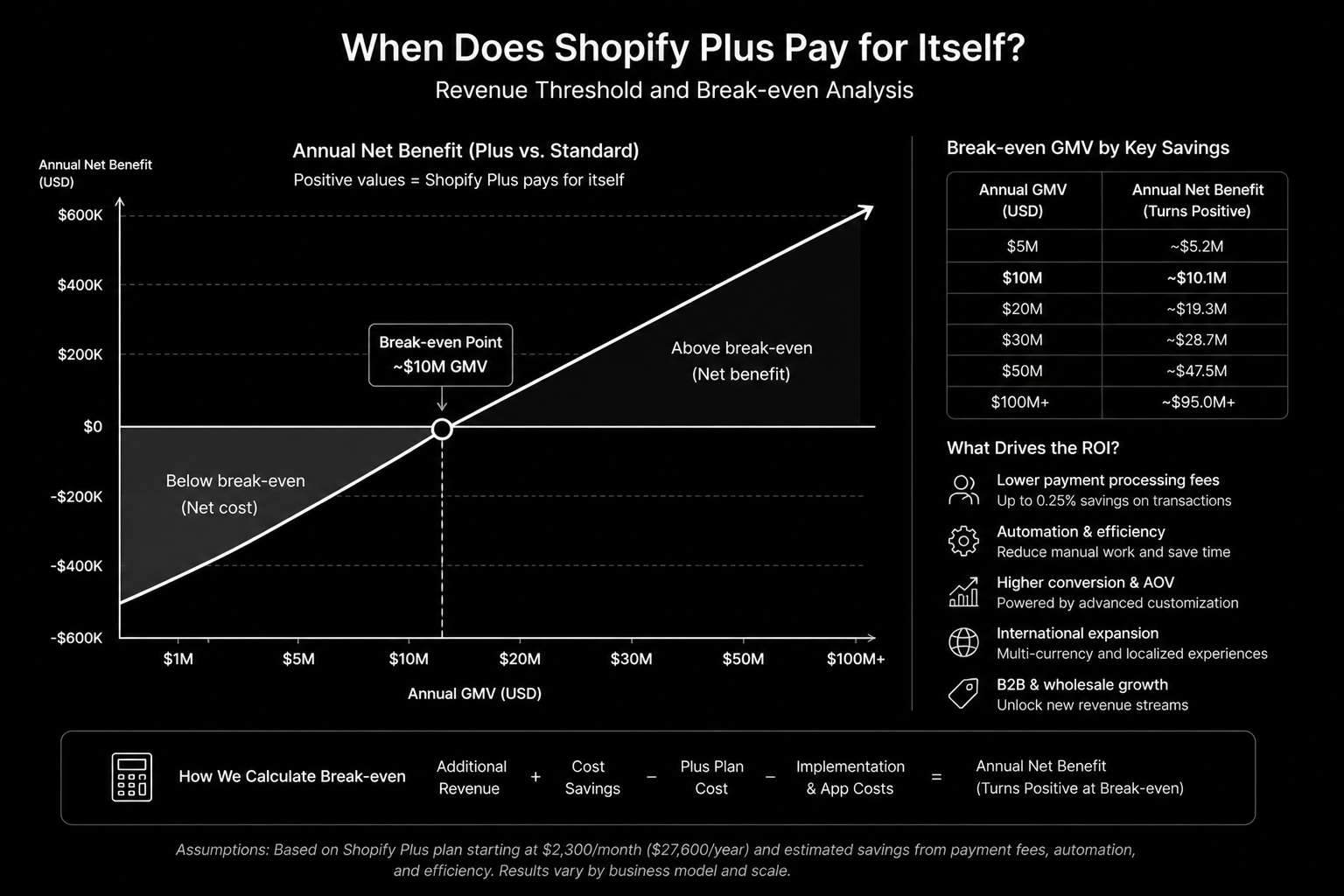
When Shopify Plus makes sense
Plus has a significant fixed monthly cost, so it should pay for itself. It usually does when one or more of these is true:
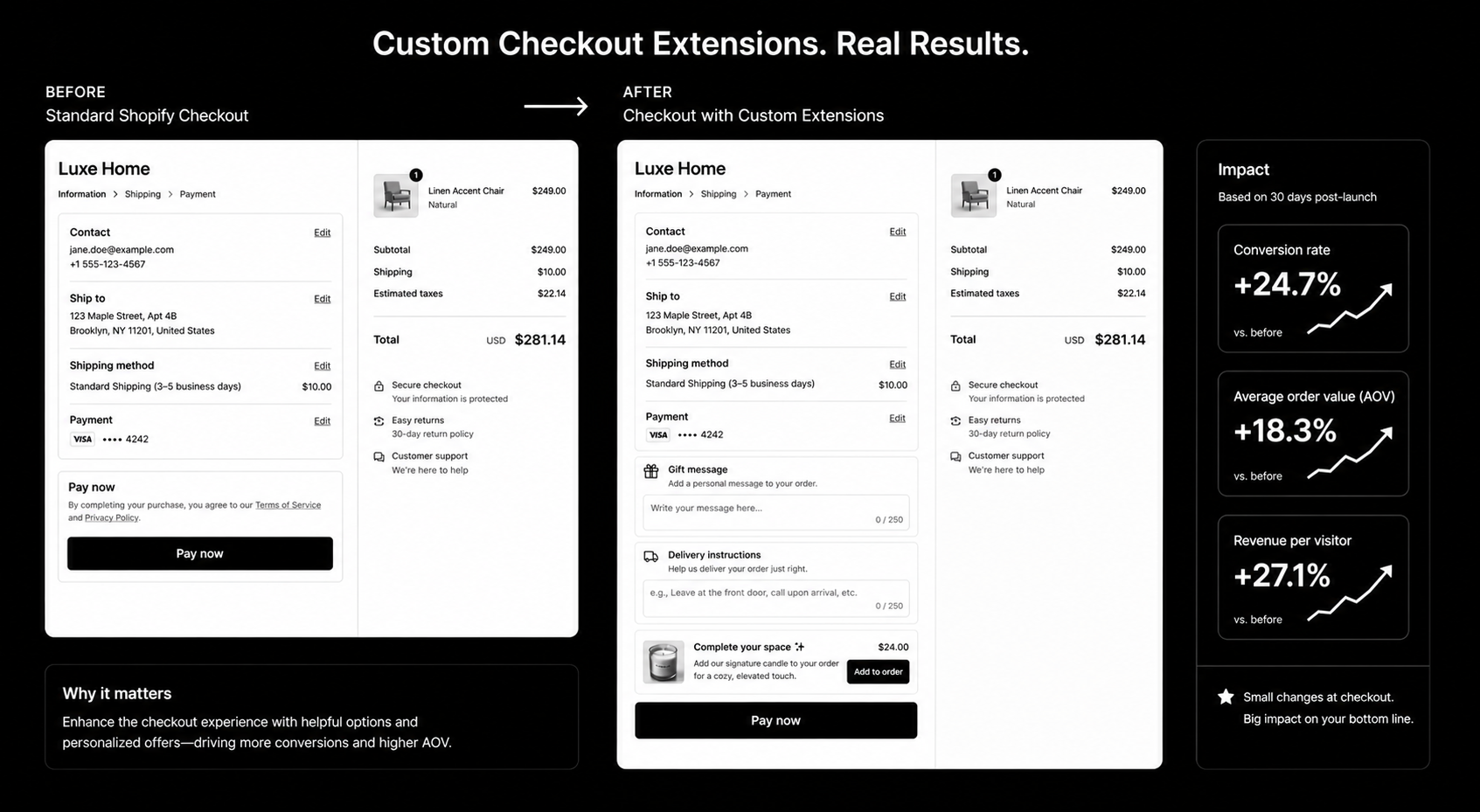
You need checkout customisation beyond what standard plans allow, such as custom fields, upsells, conditional payment or delivery options.
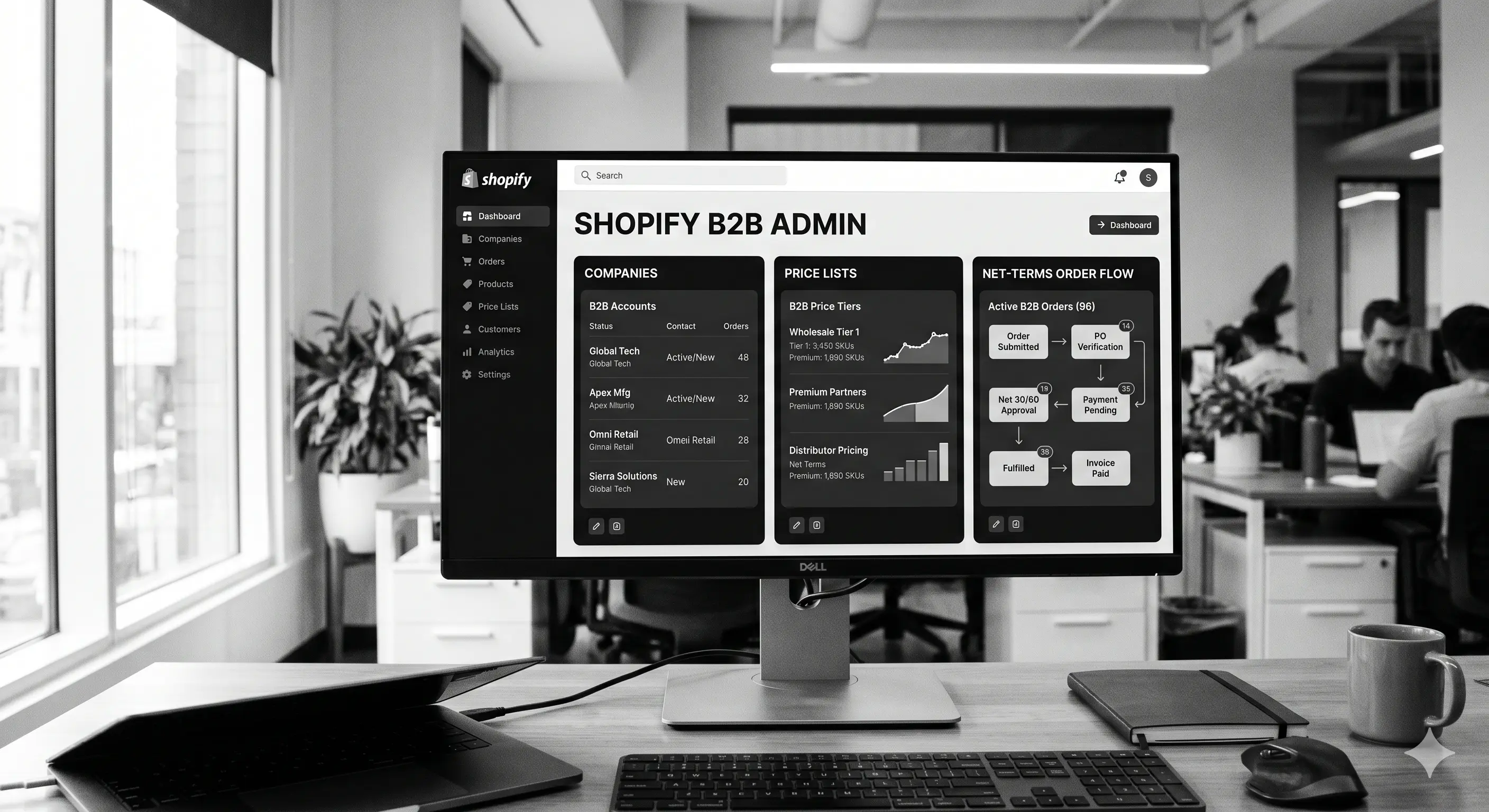
You sell wholesale and want B2B features on the same store: company accounts, price lists, payment terms and quantity rules. See our guide to Shopify B2B and wholesale.
You run, or plan to run, several stores for different regions or brands.
You need higher API limits for ERP, PIM or warehouse integrations.
Your team spends hours on tasks that automation and scheduling tools could handle.
Check Shopify's current Plus pricing and compare it with what these features would earn or save. If none of the points above apply, an advanced standard plan is often enough.
What actually changes when you upgrade
Checkout
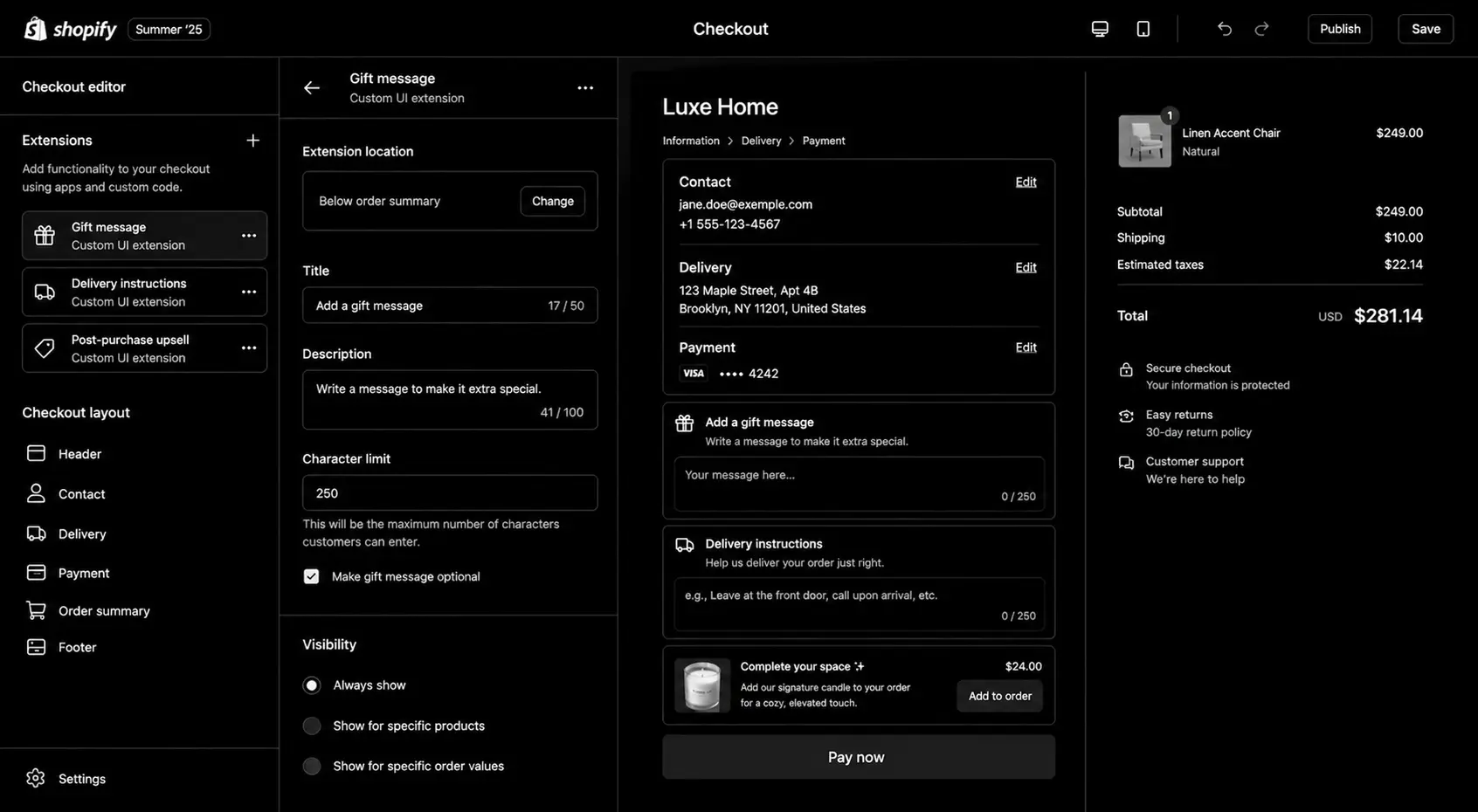
On Plus, checkout is customised through checkout extensibility: checkout UI extensions for adding content and fields, Shopify Functions for discount, payment and delivery logic, and branding settings for design. These are upgrade-safe and work with Shop Pay. Older checkout.liquid customisations are being retired, so build new checkout work on extensibility. Our checkout extensibility guide covers the details.
Discounts and scripts
Shopify Scripts are being replaced by Shopify Functions. If you're upgrading now, build discount and shipping logic as Functions rather than starting new Scripts.
B2B
B2B on Shopify lets one store serve both retail and wholesale buyers, with company profiles, catalogues, price lists, net payment terms and approval rules.
Expansion stores and organisation
Plus gives access to additional stores and an organisation admin for managing users and settings across them, useful for regional storefronts or separate brands.
Automation and scheduling
Tools for scheduling product launches, theme changes and sales, plus advanced automation workflows, remove a lot of manual late-night work.
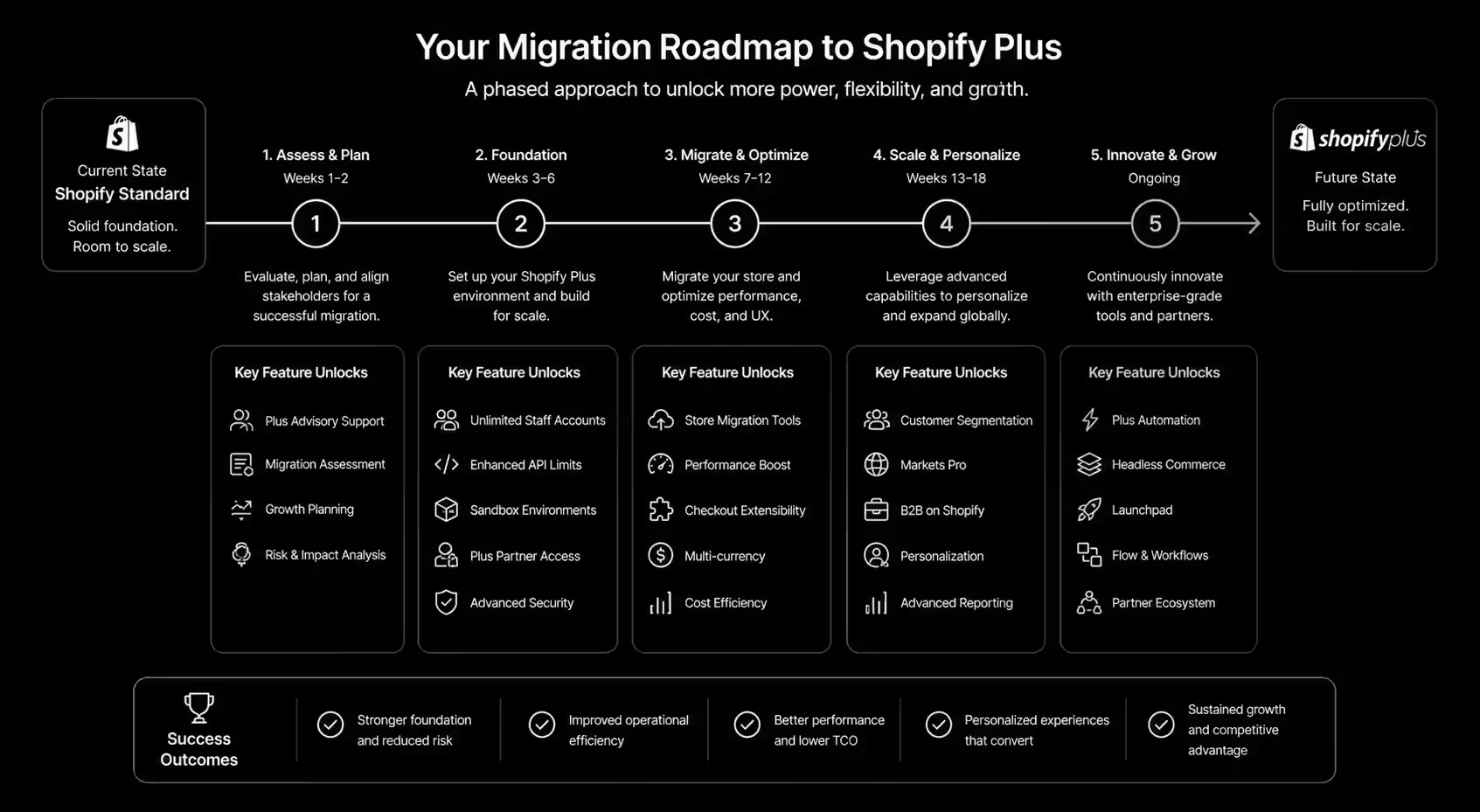
Step-by-step upgrade plan
Audit your current store. List every app, theme customisation, checkout tweak, discount rule and integration. Note what each one does and who owns it.
Map features to Plus equivalents. Decide which apps Plus features can replace, which checkout changes need extensions or Functions, and which integrations need new API access.
Check app compatibility. Confirm each checkout-related app supports checkout extensibility. Replace those that don't.
Build in a development or expansion store first. Test checkout extensions, Functions and B2B settings away from live customers.
Protect tracking. Move analytics and ad pixels to Shopify's customer events (web pixels) so conversion tracking survives checkout changes.
Plan the switchover. Choose a low-traffic window, communicate with your team, and have a rollback plan for each change.
Test end to end. Place real orders with every payment method, discount type, shipping zone and customer type (including B2B accounts).
Monitor after launch. Watch conversion rate, checkout completion, average order value and error logs daily for the first two weeks.
Protecting SEO
A plan upgrade alone doesn't change URLs, so SEO risk is low. Risk appears when the upgrade comes with a theme rebuild, new domain structure or expansion stores. In those cases, map every URL that changes to a redirect, keep product and collection handles stable, set up hreflang correctly for regional stores, and check Search Console after launch. Our ecommerce SEO team can review the plan.
Migrating to Plus from another platform
If you're coming from Magento, WooCommerce or BigCommerce, it is a full migration: products, variants, customers, order history, content and redirects all need to move. Allow time for data mapping, a test import, theme development and a full redirect plan before launch.
Common mistakes
Upgrading before you have a use for Plus features. You pay more for the same store.
Rebuilding checkout without tracking. Conversion data goes dark exactly when you need it.
Keeping every old app. Many become redundant on Plus and slow the store down.
Launching on a busy day. Change checkout in a quiet period, never before a big sale.
FAQ
Does upgrading to Shopify Plus require a store migration?
No. Upgrading a standard Shopify store to Plus keeps your data, theme and URLs. The work is in using the new features safely.
How long does a Shopify Plus upgrade project take?
A straightforward upgrade with a few checkout extensions can take a few weeks. Projects that add B2B, expansion stores or ERP integration take longer.
Can I keep my current theme on Plus?
Yes. Your theme carries over. Many merchants use the upgrade as a moment to improve performance or move to a newer theme architecture.
Is Shopify Plus worth it for small stores?
Usually not, unless you need B2B, advanced checkout or several stores. Compare the cost with the revenue those features would unlock.
Conclusion
Shopify Plus pays off when you have a clear use for its checkout, B2B, multi-store and automation features. Audit first, build on checkout extensibility and Functions, protect tracking and test every order path before going live. If you're planning an upgrade, see our Shopify development service and Shopify Plus development guide, or book a call.
Shopify Plus Migration Toolkit — migration planning checklist, revenue protection framework, data migration worksheet, app compatibility audit, SEO preservation checklist, launch readiness checklist, and post-migration optimization roadmap for a seamless Shopify Plus upgrade.
Shopify Checkout Extensibility: What's Possible in 2026
Shopify Checkout Extensibility in 2026 is won by execution quality, not platform hype. Teams that perform consistently align strategy, implementation, and measurement into one operating system. This guide gives the practical framework, internal link map, and optimization cadence to do that.Shopify checkout used to be off-limits. The 2026 extensibility model changes that — here's what's actually possible. If you want implementation help, work with our Shopify developers. For connected strategy, also review Shopify Plus Development Guide and Shopify Conversion Rate Optimization.
What Shopify Checkout Extensibility Means in Practice
Shopify checkout extensibility enables safer checkout customization through Functions and UI extensions. The goal is conversion clarity and trust, not visual complexity.
Why shopify checkout extensibility Matters in 2026
1. Checkout remains a high-leverage conversion surface.2. Extensions are safer than legacy script hacks.3. Testable customization now makes iteration faster.
Step-by-Step Playbook
1. Audit checkout friction
Use analytics and recordings to find hesitation points.
2. Prioritize high-impact extensions
Start with delivery clarity and trust-building interactions.
3. Implement deterministic logic
Use Functions with clear rule boundaries.
4. Run controlled tests
Validate each change with conversion measurement.
5. Standardize QA
Test edge cases by device, discount, and payment state.Mid-article CTA -> Need support applying this to your stack? Checkout audit and get a scoped roadmap with timeline, owners, and KPI targets.
How long does a shopify checkout extensibility project usually take?
Most teams can ship an initial version in 4 to 8 weeks, then improve outcomes over one quarter with a weekly optimization cadence.
Is shopify checkout extensibility relevant for UK and US teams?
Yes. The core framework is consistent across both markets. Differences are usually compliance details, buying behavior, and GBP/USD planning.
What should we measure first for shopify checkout extensibility?
Track one leading metric, one conversion metric, and one revenue metric so execution stays tied to business impact.
Should we run this in-house or with a specialist partner?
If your team has deep expertise and bandwidth, in-house can work. If speed and risk control matter, working with a specialist partner is usually faster.
What is the most common failure mode?
Teams skip governance after launch. Data quality drifts, process quality declines, and performance plateaus. A simple weekly operating rhythm prevents this.
Conclusion
Shopify Checkout Extensibility performs best when execution decisions are tied to measurable outcomes from day one. Use this playbook to prioritize what matters, reduce risk, and create a repeatable optimization rhythm.Want a specialist team to accelerate delivery? Talk to our Shopify developers or book a consultation and we will map a practical rollout plan.Download the Shopify Checkout Extensions Map to implement this framework with templates and checklists.
Shopify Checkout Extensibility Toolkit — checkout customization checklist, extension planning worksheet, upgrade readiness assessment, checkout UX optimization guide, app compatibility checklist, testing framework, and launch roadmap to build a faster, more flexible Shopify checkout experience.
Shopify B2B Wholesale Store Setup: Complete 2026 Guide
Shopify B2B Wholesale Store Setup in 2026 is won by execution quality, not platform hype. Teams that perform consistently align strategy, implementation, and measurement into one operating system. This guide gives the practical framework, internal link map, and optimization cadence to do that.Shopify's native B2B features finally make wholesale viable without third-party apps. Here's the modern setup. If you want implementation help, work with Shopify Plus team. For connected strategy, also review Shopify Plus Development Guide and How to Hire Shopify Developer. You can also align execution with get a custom quote for cross-functional delivery.
What Shopify B2B Wholesale Store Setup Means in Practice
Shopify B2B wholesale is now a viable native setup with company accounts, price lists, and payment terms. Execution quality depends on account hierarchy, pricing governance, and operational handoff design.
Why shopify b2b wholesale Matters in 2026
1. Native B2B reduces app-stack fragility.2. Wholesale buyers expect self-service account logic.3. Margin pressure makes pricing controls and automation essential.
Step-by-Step Playbook
1. Design account hierarchy
Map parent accounts, locations, buyers, and permissions.
2. Build pricing logic
Define price lists, terms, and discount rules by segment.
3. Configure gated catalog
Control SKU visibility by buyer type.
4. Automate order handoffs
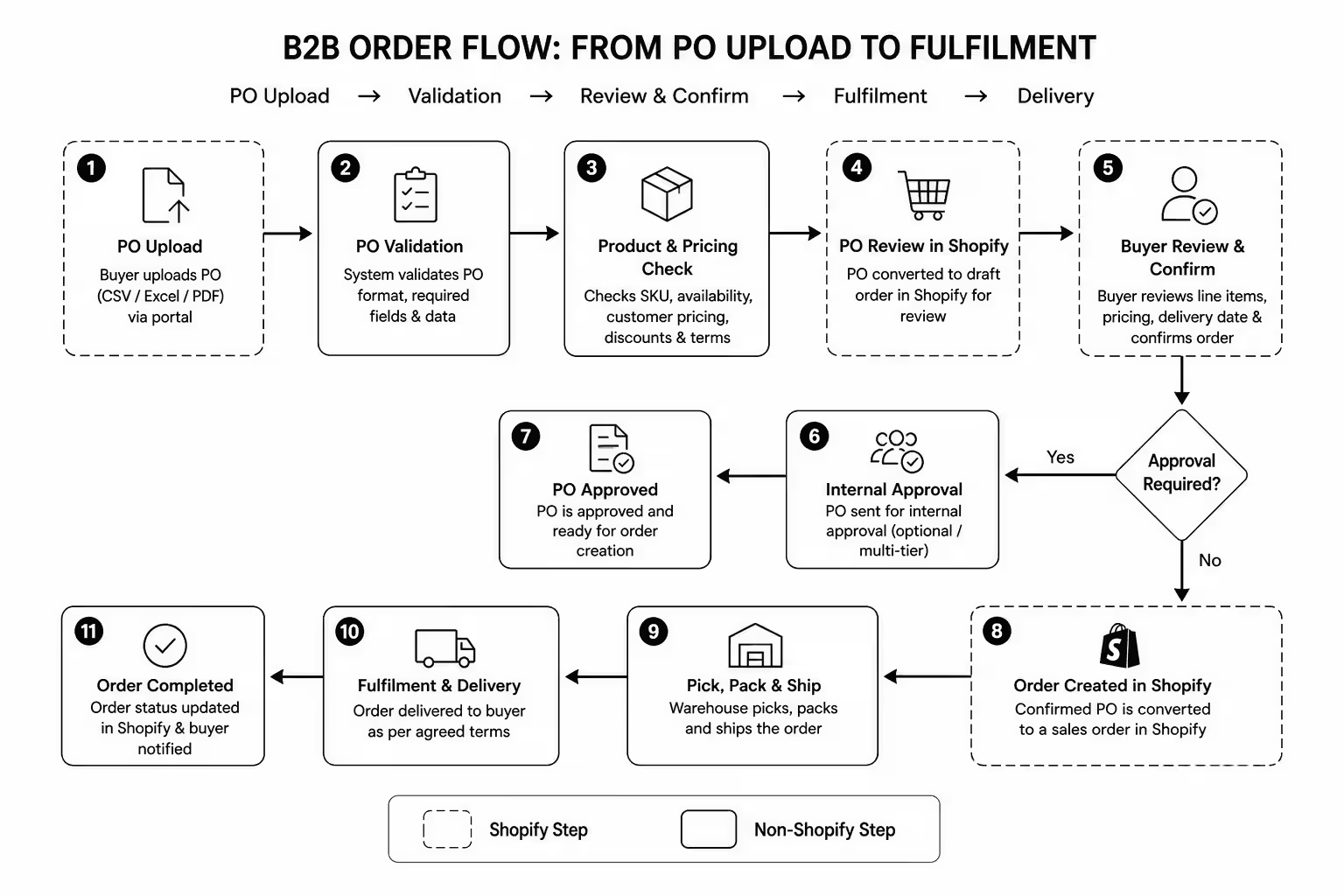
Connect PO and order states to ERP and support systems.
5. Train internal teams
Document account management and exception workflows.Mid-article CTA -> Need support applying this to your stack? Shopify B2B build call and get a scoped roadmap with timeline, owners, and KPI targets.
How long does a shopify b2b wholesale project usually take?
Most teams can ship an initial version in 4 to 8 weeks, then improve outcomes over one quarter with a weekly optimization cadence.
Is shopify b2b wholesale relevant for UK and US teams?
Yes. The core framework is consistent across both markets. Differences are usually compliance details, buying behavior, and GBP/USD planning.
What should we measure first for shopify b2b wholesale?
Track one leading metric, one conversion metric, and one revenue metric so execution stays tied to business impact.
Should we run this in-house or with a specialist partner?
If your team has deep expertise and bandwidth, in-house can work. If speed and risk control matter, working with a specialist partner is usually faster.
What is the most common failure mode?
Teams skip governance after launch. Data quality drifts, process quality declines, and performance plateaus. A simple weekly operating rhythm prevents this.
Conclusion
Shopify B2B Wholesale Store Setup performs best when execution decisions are tied to measurable outcomes from day one. Use this playbook to prioritize what matters, reduce risk, and create a repeatable optimization rhythm.Want a specialist team to accelerate delivery? Talk to Shopify Plus team or book a consultation and we will map a practical rollout plan.Download the Shopify B2B Setup Workbook to implement this framework with templates and checklists.
Shopify B2B Wholesale Store Setup Toolkit — B2B requirements checklist, wholesale pricing framework, customer segmentation planner, Shopify B2B configuration guide, order workflow template, sales team handoff checklist, and launch roadmap to build a scalable wholesale ecommerce operation.

.svg)






.svg)
.svg)

.svg)


.svg)
.svg)
.svg)
.svg)
.svg)
.svg)



.svg)